[BUG]: DATETIME empty field not saved correctly. #1245

Closed
opened 2025-08-27 18:19:15 +00:00 by Tom van der Laan · 24 comments
Member

What Happened?

If i create a non required datetime field using the OTHER (EMPTY) option for the db so the table matches how joomla saves datetime fields and there is no issue with newer mysql versions it does not save the field.

I get this error instead:

Save failed with the following error: Incorrect datetime value: '' for column db_extension.prefix_component_table.publish_up at row 1.

In order to fix this issue i had to add this to my save method in the admin view:

        if ($data['publish_up'] == '') {
            $data['publish_up'] = null;
        }

The next issue that arrose is that it did not save an empty value. because in the store function of the src/Table/View.php it is saving using $updateNulls = false;

I have no idea how to override this. But if i hard code it to true at the top it did save the null value like it was supposed to do.

Hope we can sort out what needs to be done to support datetime using the null option.

Steps to reproduce the Bug

add a datetime field with db default value NULL (OTHER -> EMPTY) to an admin view.
try to save the admin view with no date present.

expected: to save without date.
result: error could not save it.

Which Joomla version are you compiling in?

5.3

Which PHP version are you compiling in?

8.3

Which Joomla versions are you targeting?

5.3

Which PHP version are you targeting?

8.3

Which Web server is JCB running on?

litespeed

Which Relational Database is JCB running on?

mariadb 10.11

Which OS is JCB running on?

almalinux 9

Which JCB version are you using?

5.1.1 stable

Where in JCB did this issue occur?

Admin View(admin_view)

On which browsers did you encounter the issue?

Firefox, Safari

Additional Comments

No response

### What Happened? If i create a non required datetime field using the OTHER (EMPTY) option for the db so the table matches how joomla saves datetime fields and there is no issue with newer mysql versions it does not save the field. I get this error instead: Save failed with the following error: Incorrect datetime value: '' for column `db_extension`.`prefix_component_table`.`publish_up` at row 1. In order to fix this issue i had to add this to my save method in the admin view: ``` if ($data['publish_up'] == '') { $data['publish_up'] = null; } ``` The next issue that arrose is that it did not save an empty value. because in the store function of the src/Table/View.php it is saving using $updateNulls = false; I have no idea how to override this. But if i hard code it to true at the top it did save the null value like it was supposed to do. Hope we can sort out what needs to be done to support datetime using the null option. ### Steps to reproduce the Bug add a datetime field with db default value NULL (OTHER -> EMPTY) to an admin view. try to save the admin view with no date present. expected: to save without date. result: error could not save it. ### Which Joomla version are you compiling in? 5.3 ### Which PHP version are you compiling in? 8.3 ### Which Joomla versions are you targeting? 5.3 ### Which PHP version are you targeting? 8.3 ### Which Web server is JCB running on? litespeed ### Which Relational Database is JCB running on? mariadb 10.11 ### Which OS is JCB running on? almalinux 9 ### Which JCB version are you using? 5.1.1 stable ### Where in JCB did this issue occur? Admin View(admin_view) ### On which browsers did you encounter the issue? Firefox, Safari ### Additional Comments _No response_
Tom van der Laan added the Bug label 2025-08-27 18:19:15 +00:00
Owner

T o get a field to save as null you must set the default to EMPTY like this:

image.png

This will cause the field to behave as expected. We took this direction since leaving a default empty is an empty string.... be for it to be really empty, we opt for the EMPTY key word.... might need improvement, but it does the job.

T o get a field to save as null you must set the default to `EMPTY` like this: ![image.png](https://git.vdm.dev/attachments/43e9dec8-e46a-4e2b-9fcb-be658eaaa4c9) This will cause the field to behave as expected. We took this direction since leaving a default empty is an empty string.... be for it to be really empty, we opt for the `EMPTY` key word.... might need improvement, but it does the job.
Author
Member

Yes i know that is exactly what i did. But joomla still tries to put an empty string in it. wondering maybe because i left default empty in the field params. i'll go check that.

Yes i know that is exactly what i did. But joomla still tries to put an empty string in it. wondering maybe because i left default empty in the field params. i'll go check that.
Author
Member

Here are some screenshots of my field and my db settings of the field.

Here are some screenshots of my field and my db settings of the field.
Author
Member

Yes i know that is exactly what i did. But joomla still tries to put an empty string in it. wondering maybe because i left default empty in the field params. i'll go check that.

This was not the cause unfortunately.

> Yes i know that is exactly what i did. But joomla still tries to put an empty string in it. wondering maybe because i left default empty in the field params. i'll go check that. This was not the cause unfortunately.
Author
Member

Is there any way i can help in debugging this? I already figured out what i needed to change to get it working. But that is "core hacks" there must be a better way to do this.

Is there any way i can help in debugging this? I already figured out what i needed to change to get it working. But that is "core hacks" there must be a better way to do this.
Owner

The place in the compiler where we set the SQL for the field is here:

// to get just null value add EMPTY to other value.
if ($default === 'EMPTY')
{
$default = $data['null_switch'];
}

This means the Sql Table is setup correctly, and the rest is Joomla... we do not directly control how a field is stored, we just write the code that Joomla needs to make those decisions, unless we change the default modeling of the field. With advance modeling we can step into the moment the field is retrieved, and or when its saved. We can load a class at that point, and use it to model the value of this field. So beyond the defaults of Joomla... that it the control we have in JCB.

Since you set the value to EMPTY it will correctly set your sql field, like this example

Here is the date field in JCB:
image.png
image.png
image.png

Here is the SQL:

`modified` DATETIME NULL,

Here is the model code (you will see we do not touch the field in the save method its all Joomla):

public function save($data)
{
$input = Factory::getApplication()->getInput();
$filter = InputFilter::getInstance();
// set the metadata to the Item Data
if (isset($data['metadata']) && isset($data['metadata']['author']))
{
$data['metadata']['author'] = $filter->clean($data['metadata']['author'], 'TRIM');
$metadata = new Registry;

So when you say fix, it does not sound right to me, there is nothing to fix here when I look at the generated code. The question is, is your database setup correctly?

I mean is the field up to date with the SQL? We have a Class in JCB that fixes all database discrepancies from update to update, and it is demonstrated in the demo component, component area, under the Dash & Install tab, it looks like this:

[CUSTOMCODE=databaseSchemaCheckCall]

This little custom code snippet is all you need to add... here is the code in the snippet:

// Check that the database is up-to date
if ($this->classExists(Super___709d7294_9a43_46e2_b64e_d16a16f0eab1___Power::class))
{
		(new Super___709d7294_9a43_46e2_b64e_d16a16f0eab1___Power())->run();
}

Then JCB will ensure that your database is auto corrected, you will no longer need the SQL updates... this is the newer better way of dealing with that. This is what is used to secure, and move all of JCB's own database tables forward.

The place in the compiler where we set the SQL for the field is here: https://git.vdm.dev/joomla/Component-Builder/src/commit/45453f733054d606e78d7d2ec2c3f515fe359694/libraries/vendor_jcb/VDM.Joomla/src/Componentbuilder/Compiler/Helper/Interpretation.php#L9946-L9950 This means the Sql Table is setup correctly, and the rest is Joomla... we do not directly control how a field is stored, we just write the code that Joomla needs to make those decisions, unless we change the default modeling of the field. With advance modeling we can step into the moment the field is retrieved, and or when its saved. We can load a class at that point, and use it to model the value of this field. So beyond the defaults of Joomla... that it the control we have in JCB. Since you set the value to `EMPTY` it will correctly set your sql field, like this example Here is the date field in JCB: ![image.png](https://git.vdm.dev/attachments/bc076c98-1c33-49ac-bf68-1cd736af7955) ![image.png](https://git.vdm.dev/attachments/106a5f30-9310-4e9d-a0d4-bf5259b5828f) ![image.png](https://git.vdm.dev/attachments/2ca6026a-96f1-474c-a005-37f39ca9ad00) Here is the SQL: https://git.vdm.dev/joomla/Component-Builder/src/commit/45453f733054d606e78d7d2ec2c3f515fe359694/admin/sql/install.mysql.utf8.sql#L67 Here is the model code (you will see we do not touch the field in the save method its all Joomla): https://git.vdm.dev/joomla/Component-Builder/src/commit/45453f733054d606e78d7d2ec2c3f515fe359694/admin/src/Model/Joomla_componentModel.php#L1445-L1663 So when you say fix, it does not sound right to me, there is nothing to fix here when I look at the generated code. The question is, is your database setup correctly? I mean is the field up to date with the SQL? We have a Class in JCB that fixes all database discrepancies from update to update, and it is demonstrated in the demo component, component area, under the `Dash & Install` tab, it looks like this: ``` [CUSTOMCODE=databaseSchemaCheckCall] ``` This little custom code snippet is all you need to add... here is the code in the snippet: ``` // Check that the database is up-to date if ($this->classExists(Super___709d7294_9a43_46e2_b64e_d16a16f0eab1___Power::class)) { (new Super___709d7294_9a43_46e2_b64e_d16a16f0eab1___Power())->run(); } ``` Then JCB will ensure that your database is auto corrected, you will no longer need the SQL updates... this is the newer better way of dealing with that. This is what is used to secure, and move all of JCB's own database tables forward.
Author
Member

i'll compare screenshots but i already see that (probably) i don't have the escape false setting. maybe thats why it is not working but i can only test it later tonight again. Thanks for explanation ❤️

i'll compare screenshots but i already see that (probably) i don't have the escape false setting. maybe thats why it is not working but i can only test it later tonight again. Thanks for explanation ❤️
Author
Member

OK I've added your power code so it checks the DB.

This is my DB (as you can see it is exactly like the modified db field):
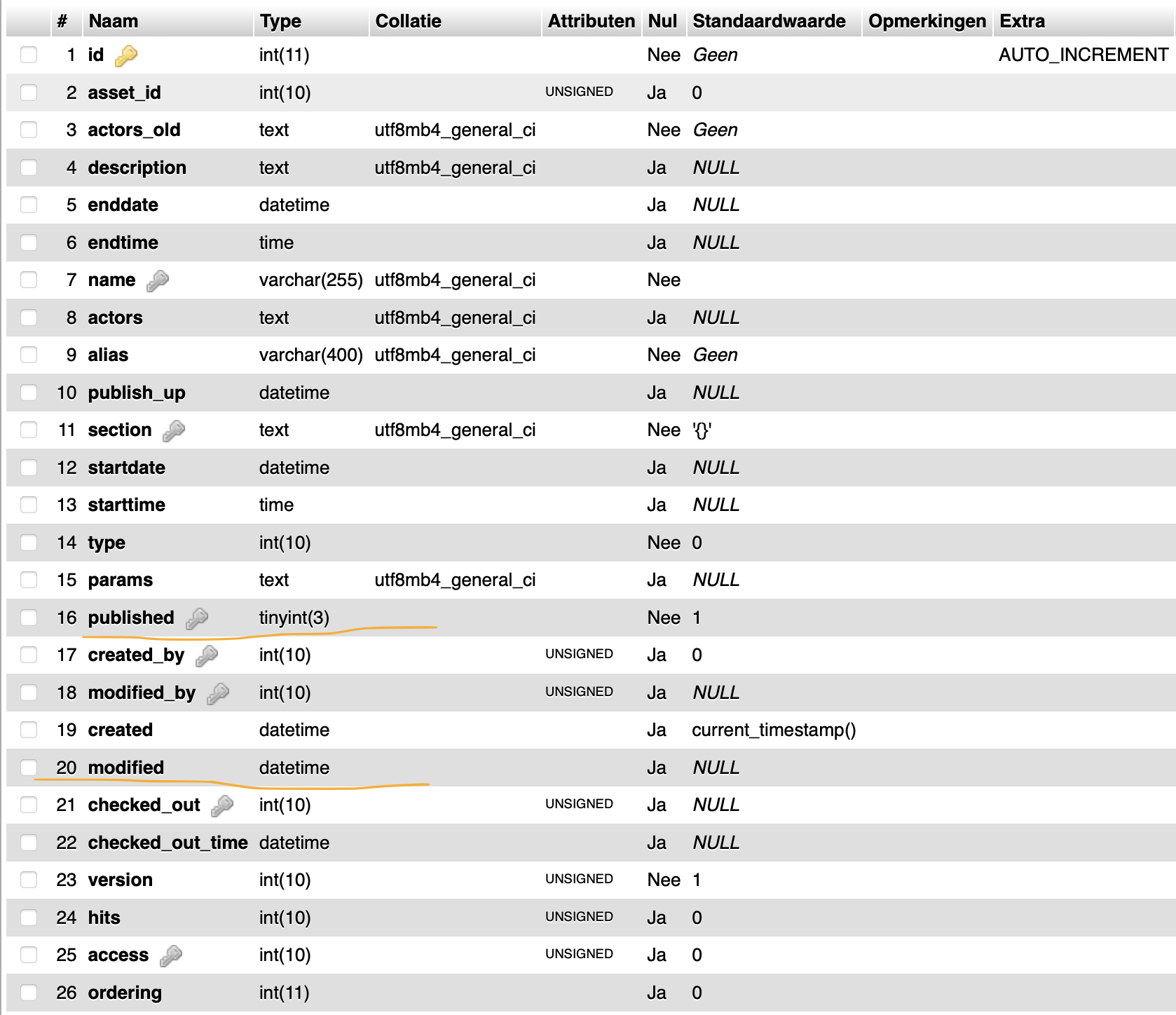
Scherm­afbeelding 2025-09-02 om 19.07.37.png

So the DB is correct.

These are my field settings:
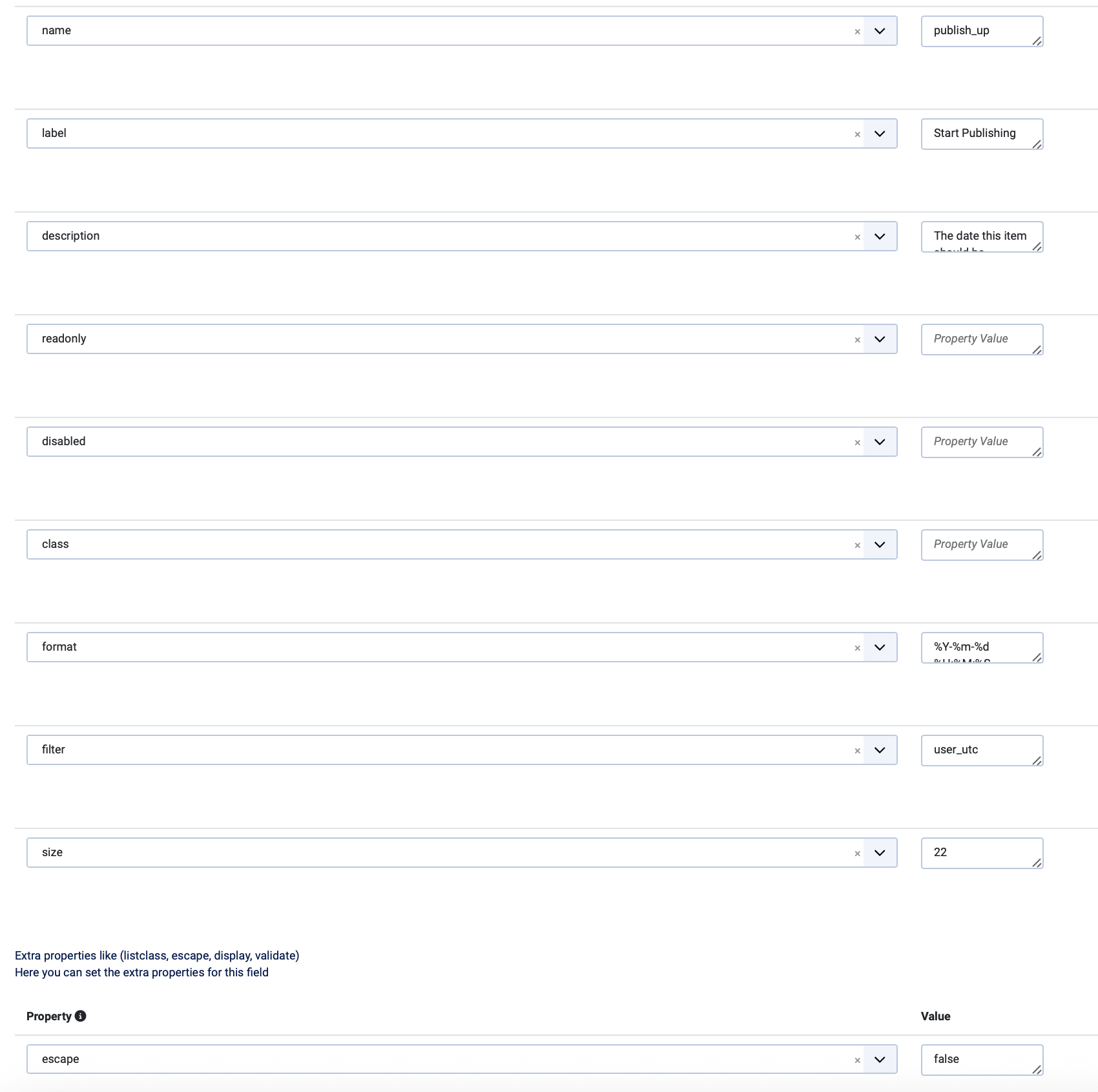
Scherm­afbeelding 2025-09-02 om 19.09.26.pngScherm­afbeelding 2025-09-02 om 19.09.34.png

But i am still unable to save an empty date field in the backend.

OK I've added your power code so it checks the DB. This is my DB (as you can see it is exactly like the modified db field): <img width="839" alt="Scherm­afbeelding 2025-09-02 om 19.07.37.png" src="attachments/940308a5-cc37-486a-ad85-dbada9f40040"> So the DB is correct. These are my field settings: <img width="850" alt="Scherm­afbeelding 2025-09-02 om 19.09.26.png" src="attachments/4faffff7-1cf1-4202-83e6-e06344af4f4e"><img width="1701" alt="Scherm­afbeelding 2025-09-02 om 19.09.34.png" src="attachments/e28af729-6585-48f8-af36-b464b17cbb01"> But i am still unable to save an empty date field in the backend.

Author
Member

Also i am unable to clear any date field that previously had a value because of the updateNulls being set to "false" in the Table class of the respective view.

Also i am unable to clear any date field that previously had a value because of the updateNulls being set to "false" in the Table class of the respective view.
Author
Member

Ok so in Joomla Content Table class the updateNulls = true. But in our component it is always set to updateNulls = false.

https://github.com/joomla/joomla-cms/blob/153082714def8675dd180a77b519a7e9340ddf2f/libraries/src/Table/Content.php#L319

This is why it is impossible for any JCB component to remove a previous saved date if we implement the new datetime settings.

It is hard coded into the admin view template to always be null. But when you have a calendar that is set to be null and is not required. this should be updateNulls = true.

https://github.com/vdm-io/Joomla-Component-Builder/blob/129cdfe8da556bb4d51661aa43ab6970be503d94/admin/compiler/joomla_4/ADMIN_VIEW_TABLE.php#L108

Ok so in Joomla Content Table class the updateNulls = true. But in our component it is always set to updateNulls = false. https://github.com/joomla/joomla-cms/blob/153082714def8675dd180a77b519a7e9340ddf2f/libraries/src/Table/Content.php#L319 This is why it is impossible for any JCB component to remove a previous saved date if we implement the new datetime settings. It is hard coded into the admin view template to always be null. But when you have a calendar that is set to be null and is not required. this should be updateNulls = true. https://github.com/vdm-io/Joomla-Component-Builder/blob/129cdfe8da556bb4d51661aa43ab6970be503d94/admin/compiler/joomla_4/ADMIN_VIEW_TABLE.php#L108
Owner

Okay, so the Table class needs updating if I understand you correctly...

This should be set to true — that’s an easy fix. JCB should always follow the Joomla implementation. It used to be false, but now it’s true. Looking at the history on this table in Joomla, I can see it was changed 6 years ago.

Oops, seems like the JCB community has not helped us move forward on this. So I’m very grateful that you picked this up. My dad (@Llewellyn) does not sit and read through the Joomla core code every week, so I think he added it as false 10 years ago, and has never looked at it again. We can update this to align with Joomla.

By the way, anything that does not align with Joomla should be updated. This is, in fact, the reason JCB is open-source — so that those who use it can help us spot when things change in Joomla, and we can update JCB to follow the new implementations as they become known.

Okay, so the [Table clas](https://git.vdm.dev/joomla/Component-Builder/src/commit/129cdfe8da556bb4d51661aa43ab6970be503d94/admin/src/Table/Admin_viewTable.php#L103)s needs updating if I understand you correctly... This should be set to `true` — that’s an easy fix. JCB should always follow the Joomla implementation. It used to be `false`, but now it’s `true`. Looking at the history on this table in Joomla, I can see it was changed 6 years ago. Oops, seems like the JCB community has not helped us move forward on this. So I’m very grateful that you picked this up. My dad (@Llewellyn) does not sit and read through the Joomla core code every week, so I think he added it as `false` 10 years ago, and has never looked at it again. We can update this to align with Joomla. By the way, anything that does not align with Joomla should be updated. This is, in fact, the reason JCB is open-source — so that those who use it can help us spot when things change in Joomla, and we can update JCB to follow the new implementations as they become known.
Author
Member

Hi, yeah we need your dads big brain to see if this is what needs to be updated, if it can be done safely and if there is not another way that this should be done instead 😀. I'm not knowledgeable enough to assess this. I can just provide my findings and what i did to remedy the symptoms but i'm not sure i am also cured the cause. one part of it (the changing the empty to null i'm sure that is not the proper way to treat the cause).

Hi, yeah we need your dads big brain to see if this is what needs to be updated, if it can be done safely and if there is not another way that this should be done instead 😀. I'm not knowledgeable enough to assess this. I can just provide my findings and what i did to remedy the symptoms but i'm not sure i am also cured the cause. one part of it (the changing the empty to null i'm sure that is not the proper way to treat the cause).
Author
Member

More info on this topic in joomla cms. it's the exact same error:

https://github.com/joomla/joomla-cms/issues/41519#issuecomment-1698925077

I also see joomla in the check function set the value to explicit NULL where we don't do that.

See here
https://github.com/joomla/joomla-cms/blob/153082714def8675dd180a77b519a7e9340ddf2f/libraries/src/Table/Content.php#L256

So taking into consideration my limited knowledge of things. I think we need 2 things;

We need to set the protected $_supportNullValue = true; and public function store($updateNulls = true) in our Table classes.

And we need to add any DATETIME Fields that have NULL as default value to be added to the check function and set to NULL if value is empty.

More info on this topic in joomla cms. it's the exact same error: https://github.com/joomla/joomla-cms/issues/41519#issuecomment-1698925077 I also see joomla in the check function set the value to explicit NULL where we don't do that. See here https://github.com/joomla/joomla-cms/blob/153082714def8675dd180a77b519a7e9340ddf2f/libraries/src/Table/Content.php#L256 So taking into consideration my limited knowledge of things. I think we need 2 things; We need to set the protected $_supportNullValue = true; and public function store($updateNulls = true) in our Table classes. And we need to add any DATETIME Fields that have NULL as default value to be added to the check function and set to NULL if value is empty.
Robot referenced this issue from a commit 2025-09-03 20:33:30 +00:00
Robot referenced this issue from a commit 2025-09-03 20:35:06 +00:00
Author
Member

Just tested alpha 3. it fixes part of the problem so we're halfway there. Now we need extra code in the check function of the table when there is a datetime field in that table. BUT only when the settings for the db is EMPTY and NULL. Else we should not do this. Because it would break older setups. Then we will have the complete solution.

Just tested alpha 3. it fixes part of the problem so we're halfway there. Now we need extra code in the check function of the table when there is a datetime field in that table. BUT only when the settings for the db is EMPTY and NULL. Else we should not do this. Because it would break older setups. Then we will have the complete solution.
Owner

I haven't had time yet to fully test all the changes we've made so far. There's a possibility that we might still need to add a few switches to manage this properly, rather than changing a default setting without warning.

Regarding the additional care required for the field you're adding, I'm not sure we should try to automate that. You can handle it directly in the save method by catching and managing it there. The key question is whether this implementation — and the outcome you expect — aligns with normal behavior and what other users would also expect.

Since I haven't had the chance to test it myself, I don't fully understand the implementation yet. Once I can test it, I'll have a clearer picture. For now, I've added the “allow null” values to work explicitly, so you can proceed with testing your field. If you find you still need more changes, custom coding it and then sharing what you did (and where) in the JCB GUI will be very helpful. Not just the code but where you added it.

I haven't had time yet to fully test all the changes we've made so far. There's a possibility that we might still need to add a few switches to manage this properly, rather than changing a default setting without warning. Regarding the additional care required for the field you're adding, I'm not sure we should try to automate that. You can handle it directly in the save method by catching and managing it there. The key question is whether this implementation — and the outcome you expect — aligns with normal behavior and what other users would also expect. Since I haven't had the chance to test it myself, I don't fully understand the implementation yet. Once I can test it, I'll have a clearer picture. For now, I've added the “allow null” values to work explicitly, so you can proceed with testing your field. If you find you still need more changes, custom coding it and then sharing what you did (and where) in the JCB GUI will be very helpful. Not just the code but where you added it.
Author
Member

Yes you definitely need to test if the updateNulls setting would cause issues. Because it is changing default behaviour. Before a null value would not update that column in the db. Where if this setting is done, it is updating and thus removing values from the db.

I linked to joomla's way of handling this below and yes i could set this myself thru the gui (not sure if i can touch the check function, will have to check that out).

I also see joomla in the check function set the value to explicit NULL where we don't do that.

See here
153082714d/libraries/src/Table/Content.php (L256)

Yes you definitely need to test if the updateNulls setting would cause issues. Because it is changing default behaviour. Before a null value would not update that column in the db. Where if this setting is done, it is updating and thus removing values from the db. I linked to joomla's way of handling this below and yes i could set this myself thru the gui (not sure if i can touch the check function, will have to check that out). I also see joomla in the check function set the value to explicit NULL where we don't do that. See here [153082714d/libraries/src/Table/Content.php (L256) ](https://github.com/joomla/joomla-cms/blob/153082714def8675dd180a77b519a7e9340ddf2f/libraries/src/Table/Content.php#L256)
Owner

@TLWebdesign we have recently come across the same issue and the fix was quite simple.
You simply need to Reset(update) the class VDM.Abstraction.BaseTable (Super___e0f6ddbe_2a35_4537_942c_faff2ebd04f6___Power) so that you have the latest version of that class. This fixed the issue for us on a older system.
image.png

With new systems this should not be necessary, since it should have the latest version of this class.

@TLWebdesign we have recently come across the same issue and the fix was quite simple. You simply need to Reset(update) the class [VDM.Abstraction.BaseTable](https://git.vdm.dev/joomla/super-powers/src/branch/master/src/e0f6ddbe-2a35-4537-942c-faff2ebd04f6) (Super___e0f6ddbe_2a35_4537_942c_faff2ebd04f6___Power) so that you have the latest version of that class. This fixed the issue for us on a older system. ![image.png](https://git.vdm.dev/attachments/10937736-1379-41dd-80d9-21173684865c) With new systems this should not be necessary, since it should have the latest version of this class.
Author
Member

Hi, what exactly did it fix? Because i reset the class but it did not change anything for me. I am having issues with my own date fields. But even generated fields like published field which is auto generated by JCB have the same issue. See attached screenshot. This is on beta 2. But this is happening because for the generated fields it also does not explicitly set the field value to null. Like i have shown a couple times now before.

Hi, what exactly did it fix? Because i reset the class but it did not change anything for me. I am having issues with my own date fields. But even generated fields like published field which is auto generated by JCB have the same issue. See attached screenshot. This is on beta 2. But this is happening because for the generated fields it also does not explicitly set the field value to null. Like i have shown a couple times now before.
Author
Member

Can confirm this bug is still present in Beta 3.

Can confirm this bug is still present in Beta 3.
Owner

In Joomla 4 and 5 (initially), it was possible to save an empty date field as-is without issues, but something in Joomla's downstream data handling has clearly changed. We have already adapted our table class to accommodate null values where possible. However, we're hesitant to enforce a global behavior of converting empty date values automatically because this creates a number of challenges:

  • Developer Expectations Differ: Some developers want empty dates to default to the zero date (0000-00-00 00:00:00), others expect NULL, and others still would prefer to block empty dates entirely.
  • Diverse Use Cases: Date fields can be required, optional, conditionally displayed, or hidden by permissions. If we automatically convert empty strings, we risk overwriting intentionally hidden or omitted data.
  • Clarity of Intent: A date field that is truly empty behaves more like a text field. If a date field exists, it is expected to hold a date — even if that date is the zero date.

For this reason, we currently believe the most robust solution is to leave this decision to the implementer. The recommended approach would be:

  1. Check for Field Presence: Ensure the field is part of the posted data set (it may be omitted entirely if hidden by permissions).

  2. Check for Emptiness: If present but empty, programmatically set your preferred default date before saving.

    • This can be a real date, the zero date, or even NULL (if your database schema supports it).
  3. Optional UX Adjustment: If a date is mandatory, prevent users from leaving it empty by requiring a date picker value or hiding the field and providing a default automatically.

This keeps our core behavior consistent and avoids introducing potentially conflicting logic that might override custom solutions developers have already implemented.

That said, we're open to discussion. If you believe there's a clear, general solution that Joomla itself should adopt for empty date handling, we'd love to hear your proposal. A well-defined approach — including what the default should be in all cases — could help avoid ambiguity and standardize behavior for everyone.

In Joomla 4 and 5 (initially), it was possible to save an empty date field as-is without issues, but something in Joomla's downstream data handling has clearly changed. We have already adapted our table class to accommodate `null` values where possible. However, we're hesitant to enforce a global behavior of converting empty date values automatically because this creates a number of challenges: * **Developer Expectations Differ:** Some developers want empty dates to default to the zero date (`0000-00-00 00:00:00`), others expect `NULL`, and others still would prefer to block empty dates entirely. * **Diverse Use Cases:** Date fields can be required, optional, conditionally displayed, or hidden by permissions. If we automatically convert empty strings, we risk overwriting intentionally hidden or omitted data. * **Clarity of Intent:** A date field that is truly empty behaves more like a text field. If a date field exists, it is expected to hold a date — even if that date is the zero date. For this reason, we currently believe the most robust solution is to leave this decision to the implementer. The recommended approach would be: 1. **Check for Field Presence:** Ensure the field is part of the posted data set (it may be omitted entirely if hidden by permissions). 2. **Check for Emptiness:** If present but empty, programmatically set your preferred default date before saving. * This can be a real date, the zero date, or even `NULL` (if your database schema supports it). 3. **Optional UX Adjustment:** If a date is mandatory, prevent users from leaving it empty by requiring a date picker value or hiding the field and providing a default automatically. This keeps our core behavior consistent and avoids introducing potentially conflicting logic that might override custom solutions developers have already implemented. That said, we're open to discussion. If you believe there's a clear, general solution that Joomla itself should adopt for empty date handling, we'd love to hear your proposal. A well-defined approach — including what the default should be in all cases — could help avoid ambiguity and standardize behavior for everyone.
Author
Member

I totally understand the hesitance to just force a different behaviour globally. Thats why we need to it in a smart way.

Joomla itself does extra cleanup in their Table "check" function to clean up empty dates before saving.

I'm not entirely sure what field information is available when creating the Table classes of the component. Do you have the field information available for instance? if this information is available we can add the needed clean up code only if the table file you are generating matches following criteria:

foreach ($fields as $field)
    if $field->type == "DATE" or "DATETIME" && DEFAULT = EMPTY
        add this code:
        if (isset(fieldname) && $fieldname ==="") {
            $fieldname = null;
        }

I'd like to test this by changing it myself if you can point me in the right direction on how i could try to implement this in current compiler?

I totally understand the hesitance to just force a different behaviour globally. Thats why we need to it in a smart way. Joomla itself does extra cleanup in their Table "check" function to clean up empty dates before saving. I'm not entirely sure what field information is available when creating the Table classes of the component. Do you have the field information available for instance? if this information is available we can add the needed clean up code only if the table file you are generating matches following criteria: ``` foreach ($fields as $field) if $field->type == "DATE" or "DATETIME" && DEFAULT = EMPTY add this code: if (isset(fieldname) && $fieldname ==="") { $fieldname = null; } ``` I'd like to test this by changing it myself if you can point me in the right direction on how i could try to implement this in current compiler?
Robot referenced this issue from a commit 2025-10-15 20:35:52 +00:00
Robot referenced this issue from a commit 2025-10-15 20:57:03 +00:00
Robot referenced this issue from a commit 2025-10-15 21:07:33 +00:00
Owner

I know this is like 4 months ago, but here is the smart way...

image.png

On Save Model:

if (empty([[[field]]]))
{
	[[[field]]] = null;
}

This will make the value null if empty and so allow you to tweak the behavior as you feel fit.

I know this is like 4 months ago, but here is the smart way... ![image.png](https://git.vdm.dev/attachments/13e76a49-373e-442a-a921-ab56a0635223) On Save Model: ``` if (empty([[[field]]])) { [[[field]]] = null; } ``` This will make the value null if empty and so allow you to tweak the behavior as you feel fit.
Author
Member

Thanks for getting back to this. Unfortunately this only works for my own fields. Not for the default publish_up field. Is this already added by default for the jcb joomla core fields?

Thanks for getting back to this. Unfortunately this only works for my own fields. Not for the default publish_up field. Is this already added by default for the jcb joomla core fields?
Author
Member

i also noticing that this does not work for mysql DATE field type. (the EMPTY NULL db setting) To be more clear; the scan of the component tables during install (databaseSchemaCheckCall) did not change a current DATE field to the new type. Although i see it is set correctly in the install.sql file i had to manually update the table in the db.

i also noticing that this does not work for mysql DATE field type. (the EMPTY NULL db setting) To be more clear; the scan of the component tables during install (databaseSchemaCheckCall) did not change a current DATE field to the new type. Although i see it is set correctly in the install.sql file i had to manually update the table in the db.
Sign in to join this conversation.
3 Participants
Notifications
Due Date
No due date set.
Dependencies

No dependencies set.

Reference: joomla/Component-Builder#1245


