[BUG]: Power is not loaded in Component PowerLoaderHelper if only loaded through site view #1256

Closed
opened 2025-09-30 08:26:25 +00:00 by SimonvanDoorne · 8 comments
Member

What Happened?

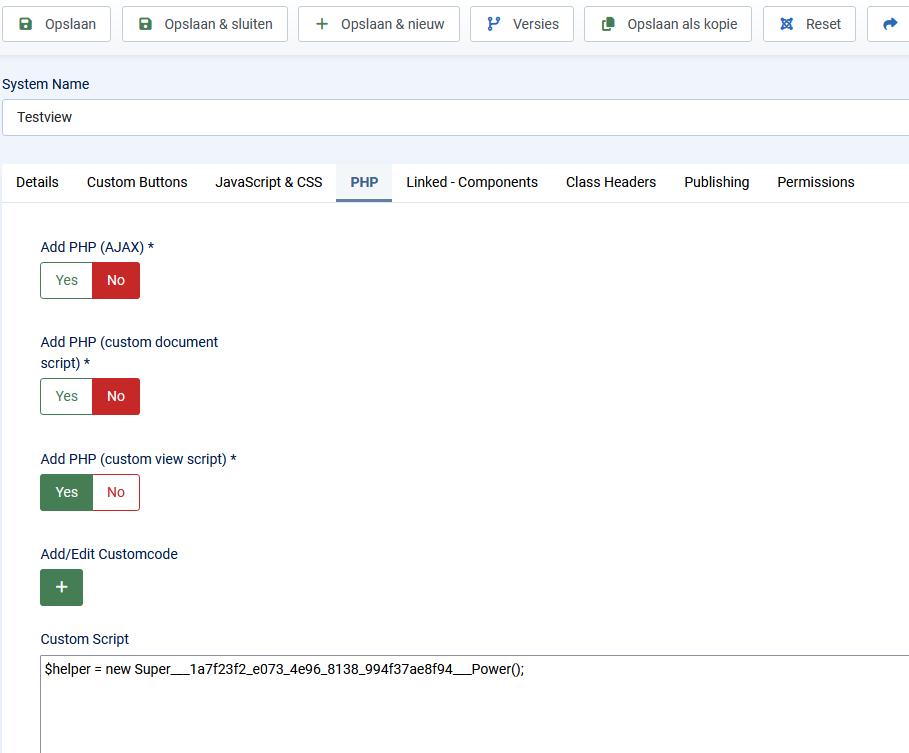
When you create a power and load it through site_view -> PHP tab -> Custom script -> SPK
afbeelding.png
afbeelding.png
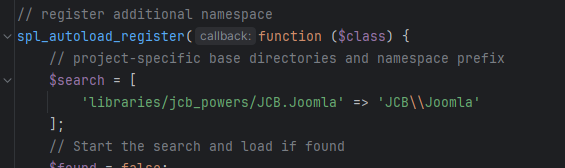
The power is created in the library folder but is not added to the PowerLoaderHelper
afbeelding.png

Steps to reproduce the Bug

  1. Create component with 1 admin view and 1 site view
  2. Create power
  3. Load power through SPK
  4. Power is created in /libraries but not in PowerLoaderHelper

Which Joomla version are you compiling in?

5.3.3

Which PHP version are you compiling in?

8.1

Which Joomla versions are you targeting?

5.3.3

Which PHP version are you targeting?

8.1

Which Web server is JCB running on?

Ubuntu

Which Relational Database is JCB running on?

MariaDB

Which OS is JCB running on?

CentOs

Which JCB version are you using?

5.1.2-beta3

Where in JCB did this issue occur?

Compilation of a component

On which browsers did you encounter the issue?

No response

Additional Comments

No response

### What Happened? When you create a power and load it through site_view -> PHP tab -> Custom script -> SPK ![afbeelding.png](/attachments/d6d116c1-6c82-429d-b962-8474e3b71eb8) ![afbeelding.png](/attachments/8e04d758-6710-483a-8372-09f07c01a113) The power is created in the library folder but is not added to the PowerLoaderHelper ![afbeelding.png](/attachments/d0f29f01-9415-43bd-ac35-64ea8fe94865) ### Steps to reproduce the Bug 1) Create component with 1 admin view and 1 site view 2) Create power 3) Load power through SPK 4) Power is created in /libraries but not in PowerLoaderHelper ### Which Joomla version are you compiling in? 5.3.3 ### Which PHP version are you compiling in? 8.1 ### Which Joomla versions are you targeting? 5.3.3 ### Which PHP version are you targeting? 8.1 ### Which Web server is JCB running on? Ubuntu ### Which Relational Database is JCB running on? MariaDB ### Which OS is JCB running on? CentOs ### Which JCB version are you using? 5.1.2-beta3 ### Where in JCB did this issue occur? Compilation of a component ### On which browsers did you encounter the issue? _No response_ ### Additional Comments _No response_
SimonvanDoorne added the Bug label 2025-09-30 08:26:25 +00:00
Owner

Try a longer namespace, with three key words like any of these:

  • [[[NamespacePrefix]]]\[[[ComponentNamespace]]]\TestHelper
  • [[[NamespacePrefix]]]\[[[ComponentNamespace]]]\Test.Helper
  • [[[NamespacePrefix]]]\Joomla\[[[ComponentNamespace]]].Test.Helper

The namespace is tricky and one needs to think that you are in the whole wide world, and trying to avoid collusion with other on the same name space.

Try a longer namespace, with three key words like any of these: - `[[[NamespacePrefix]]]\[[[ComponentNamespace]]]\TestHelper` - `[[[NamespacePrefix]]]\[[[ComponentNamespace]]]\Test.Helper` - `[[[NamespacePrefix]]]\Joomla\[[[ComponentNamespace]]].Test.Helper` The namespace is tricky and one needs to think that you are in the whole wide world, and trying to avoid collusion with other on the same name space.
Owner

I will also advice against using the default library (JCB Power Path) folder jcb_powers as this is the folder that new developers that start-out with JCB will have all their classes, as its the default. So that means all projects default to that folder. To insure that your space is unique to your project and avoid collusion with newbies, give it a Custom NamspacePrefix and a Custom folder location. This can be done globally or per project.

Globally its done:

  • under the [Compiler]->tab you set the Namespace Prefix
  • under the [Folder Paths]->tab you can set the JCB Powers Path

On the Component level its done:

  • under the [Settings]->tab you can override the Add Namespace Prefix or keep the Global
  • under the [Dynamic Integration]->tab you can override the JCB Powers Path or keep the Global
I will also advice against using the default library (JCB Power Path) folder `jcb_powers` as this is the folder that new developers that start-out with JCB will have all their classes, as its the default. So that means all projects default to that folder. To insure that your space is unique to your project and avoid collusion with newbies, give it a Custom `NamspacePrefix` and a `Custom folder location`. This can be done globally or per project. Globally its done: - under the [Compiler]->tab you set the `Namespace Prefix` - under the [Folder Paths]->tab you can set the `JCB Powers Path` On the Component level its done: - under the [Settings]->tab you can override the `Add Namespace Prefix` or keep the Global - under the [Dynamic Integration]->tab you can override the `JCB Powers Path` or keep the Global
Owner

You know this Namespacing note in JCB (but we just updated it), following its advice should always make things work:

Namespacing in JCB Super Powers

Namespaces in JCB are used to define both the folder structure and the filename of your Super Power class. The exact namespace you declare will also be the same string used in any use declaration wherever this power is linked.

For this reason:

  • The namespace must always end with the filename (matching the case of the terminating class name).
  • The namespace must contain at least three segments, ensuring a clear folder structure.
    (Example: Vendor\Package\ClassName)
  • JCB automatically generates the autoloader for your powers and injects it into your component, guaranteeing that your class is always available when the component loads.

Examples

Three-part namespace:

Namespace:  ComponentName\Sub\ClassName
File path:  root/libraries/jcb_powers/ComponentName.Sub/src/ClassName.php

Four-part namespace:

Namespace:  ComponentName\Sub\Type\ClassName
File path:  root/libraries/jcb_powers/ComponentName.Sub.Type/src/ClassName.php

Using . to create a subfolder inside src:

Namespace:  ComponentName\Sub\Util.ClassName
Interpreted: ComponentName\Sub\Util\ClassName
File path:   root/libraries/jcb_powers/ComponentName.Sub/src/Util/ClassName.php

Placeholders

You can also use placeholders in namespaces. This gives you flexibility to reuse and restructure classes across multiple projects without collisions. All placeholders linked to the component or globally set are supported.

Preferred placeholders are:

  • Vendor placeholder: [[[NamespacePrefix]]]
  • Component namespace placeholder: [[[ComponentNamespace]]]

⚠️ Although the older [[[Component]]] placeholder still works, it is discouraged in favor of the two above.

This decoupling makes it possible to restructure classes across projects while avoiding namespace conflicts, without losing the benefits of coupled maintenance.


Further Reading

For more details on how namespace autoloading works, see the PSR-4 Standard.

> You know this Namespacing note in JCB (but we just updated it), following its advice should always make things work: # Namespacing in JCB Super Powers Namespaces in JCB are used to define both the **folder structure** and the **filename** of your Super Power class. The exact namespace you declare will also be the same string used in any `use` declaration wherever this power is linked. For this reason: * The namespace must always end with the **filename** (matching the case of the terminating class name). * The namespace must contain at least **three segments**, ensuring a clear folder structure. *(Example: `Vendor\Package\ClassName`)* * JCB automatically generates the **autoloader** for your powers and injects it into your component, guaranteeing that your class is always available when the component loads. --- ### Examples **Three-part namespace:** ```text Namespace: ComponentName\Sub\ClassName File path: root/libraries/jcb_powers/ComponentName.Sub/src/ClassName.php ``` **Four-part namespace:** ```text Namespace: ComponentName\Sub\Type\ClassName File path: root/libraries/jcb_powers/ComponentName.Sub.Type/src/ClassName.php ``` **Using `.` to create a subfolder inside `src`:** ```text Namespace: ComponentName\Sub\Util.ClassName Interpreted: ComponentName\Sub\Util\ClassName File path: root/libraries/jcb_powers/ComponentName.Sub/src/Util/ClassName.php ``` --- ### Placeholders You can also use **placeholders** in namespaces. This gives you flexibility to reuse and restructure classes across multiple projects without collisions. All placeholders linked to the component or globally set are supported. Preferred placeholders are: * **Vendor placeholder:** `[[[NamespacePrefix]]]` * **Component namespace placeholder:** `[[[ComponentNamespace]]]` ⚠️ Although the older `[[[Component]]]` placeholder still works, it is **discouraged** in favor of the two above. This decoupling makes it possible to restructure classes across projects while avoiding namespace conflicts, without losing the benefits of coupled maintenance. --- ### Further Reading For more details on how namespace autoloading works, see the [PSR-4 Standard](https://www.php-fig.org/psr/psr-4/).
Author
Member

I have updated to 5.1.2-rc1 and the bug still exists. I have tried a combination of around 10 different kinds of namespaces, but no version put the namespace in the PowerloaderHelper.

I have updated to 5.1.2-rc1 and the bug still exists. I have tried a combination of around 10 different kinds of namespaces, but no version put the namespace in the PowerloaderHelper.
Owner

Please give me more information.

Please give me more information.
Author
Member

Bug: Powers are not loaded in PowerloaderHelper when power is loaded through the site_view -> PHP tab -> Custom script tab

Expected behaviour

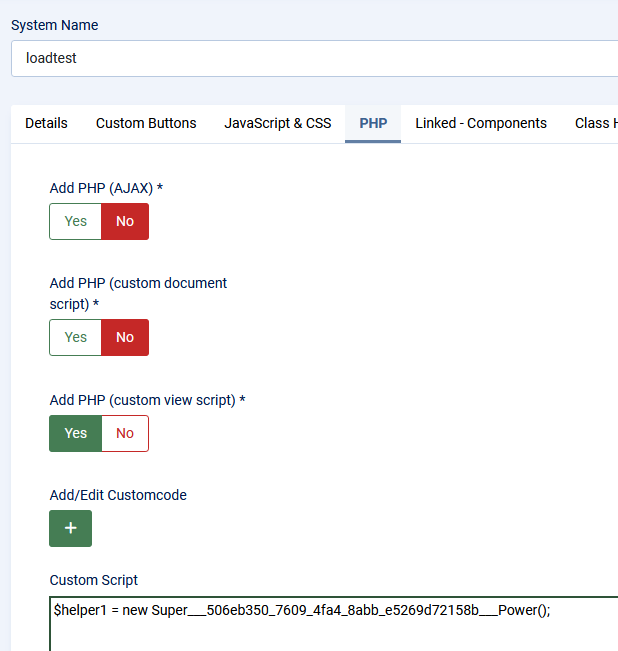
When adding an SPK in the tab site_view -> PHP tab -> Custom script tab, i expect the power to be loaded in the PowerloaderHelper
afbeelding.png

Actual result

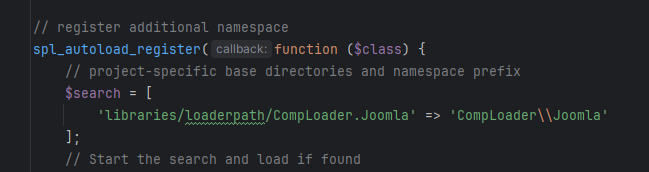
Power is not loaded in PowerloaderHelper
afbeelding.png
I tried many different versions of the fields Namespace Prefix and JCB Powers Path but no matter what my settings are, the PowerloaderHelper does not include the power i selected through SPK. The class uses [[[NamespacePrefix]]]\[[[ComponentNamespace]]]\Testest and even though it compiles the correct class in the folder /libraries/loaderpath/CompLoader/src/Powertest it's not inserted into the PowerloaderHelper

## Bug: Powers are not loaded in PowerloaderHelper when power is loaded through the site_view -> PHP tab -> Custom script tab ### Expected behaviour When adding an SPK in the tab site_view -> PHP tab -> Custom script tab, i expect the power to be loaded in the PowerloaderHelper ![afbeelding.png](/attachments/87f90418-b852-4be3-aa29-fb92d7689bbe) ### Actual result Power is not loaded in PowerloaderHelper ![afbeelding.png](/attachments/da25d166-e192-4b3e-9f89-89bbe5d2d438) I tried many different versions of the fields `Namespace Prefix` and `JCB Powers Path` but no matter what my settings are, the PowerloaderHelper does not include the power i selected through SPK. The class uses `[[[NamespacePrefix]]]\[[[ComponentNamespace]]]\Testest` and even though it compiles the correct class in the folder `/libraries/loaderpath/CompLoader/src/Powertest` it's not inserted into the PowerloaderHelper
Robot referenced this issue from a commit 2025-10-07 10:04:40 +00:00
Robot referenced this issue from a commit 2025-10-07 10:20:18 +00:00
Robot referenced this issue from a commit 2025-10-07 10:28:49 +00:00
Owner

@SimonvanDoorne please test with rc2 and let me know it the issue is resolved.

@SimonvanDoorne please test with rc2 and let me know it the issue is resolved.
Author
Member

Issue seems to be fixed with rc2! Thank you for fixing it so quickly!

Issue seems to be fixed with rc2! Thank you for fixing it so quickly!
Robot referenced this issue from a commit 2025-10-15 20:35:52 +00:00
Robot referenced this issue from a commit 2025-10-15 20:57:03 +00:00
Robot referenced this issue from a commit 2025-10-15 21:07:33 +00:00
Sign in to join this conversation.
2 Participants
Notifications
Due Date
No due date set.
Dependencies

No dependencies set.

Reference: joomla/Component-Builder#1256