I have no clue. i only know that on my extension it is not matching. And i don't know how to fix this. I'm sure it's a setting somewhere.
Expected result
database structure is up-to-date.
Actual result
database version is always one behind.
System information (as much as possible)
OS Name & Version:
MySql Version:
Apache Version:
PHP Version:
Joomla Version:
JCB Version: 6.1.4-alpha 4
Browser:
Additional comments
### Steps to reproduce the issue
I have no clue. i only know that on my extension it is not matching. And i don't know how to fix this. I'm sure it's a setting somewhere.
### Expected result
database structure is up-to-date.
### Actual result
database version is always one behind.
### System information (as much as possible)
- OS Name & Version:
- MySql Version:
- Apache Version:
- PHP Version:
- Joomla Version:
- JCB Version: 6.1.4-alpha 4
- Browser:
### Additional comments
oh i should've defined the url that is from since there is not much context in the image: https://domain.com/administrator/index.php?option=com_installer&view=database
I've encountered this issue as well, though I'm not entirely sure of its origin—it might be due to a recent change in Joomla or possibly a misunderstanding on my part. I'd really appreciate some help investigating it.
If you're able to look into it and share your findings, that would be great. I'm more than willing to implement the necessary fix once we pinpoint the cause. I'm currently focusing on other parts of the project, so any assistance with the initial legwork would definitely help move things along faster.
I've encountered this issue as well, though I'm not entirely sure of its origin—it might be due to a recent change in Joomla or possibly a misunderstanding on my part. I'd really appreciate some help investigating it.
If you're able to look into it and share your findings, that would be great. I'm more than willing to implement the necessary fix once we pinpoint the cause. I'm currently focusing on other parts of the project, so any assistance with the initial legwork would definitely help move things along faster.
ok so the file naming is what determines how it is noted (underscore vs . notation).
I also noticed that all extensions are not matching the version. This is probably because the db version is when last time there was a db update (newest sql file) when it processes a sql file with actual sql in it. it updates the schema version number in the schema table. Empty files won't work from what i read.
Also the one error showing in my screenshot is because of a change in a field i did i added a unique index. this generated sql was not being validated correctly by joomla. probably a bug or limitation in the way that joomla is processing the sql and checking it against the db is my assumption.
ok so the file naming is what determines how it is noted (underscore vs . notation).
I also noticed that all extensions are not matching the version. This is probably because the db version is when last time there was a db update (newest sql file) when it processes a sql file with actual sql in it. it updates the schema version number in the schema table. Empty files won't work from what i read.
Also the one error showing in my screenshot is because of a change in a field i did i added a unique index. this generated sql was not being validated correctly by joomla. probably a bug or limitation in the way that joomla is processing the sql and checking it against the db is my assumption.
Create and install brand new component (no copying, new admin view)
Install Component
New entry is created in #__schemas table of Joomla but with an empty value
Create new field for admin view and compile -> install
Second entry is created in Schemas table
Check administrator -> Maintenance -> Database
This is done on a clean J6 install and a clean JCB 6.1.4-alpha5 install. It seems like the remaining empty row in the schemas table is causing some trouble. Manually removing the row with the empty version solves the issues on te Maintenance page
Just tested with JCB 6.1.4-alpha5:
1) Create and install brand new component (no copying, new admin view)
2) Install Component

New entry is created in #__schemas table of Joomla but with an empty value
3) Create new field for admin view and compile -> install

Second entry is created in Schemas table
4) Check administrator -> Maintenance -> Database

This is done on a clean J6 install and a clean JCB 6.1.4-alpha5 install. It seems like the remaining empty row in the schemas table is causing some trouble. Manually removing the row with the empty version solves the issues on te Maintenance page
I had a look and found an issue and a possible solution:
Short version:
There is no 1.0.0 mysql file created when a component is compiled for the first time. The Joomla InstallerAdapter at some point calls parseQueries which in turns calls setSchemaVersion where a bug(?) happens. setSchemaVersion expects there to be a file in the mysql (or orther db driver folder), and when none are found an incorrect row in the #__schemas table is added. Adding a 1_0_0.sql file to the admin\sql\updates\mysql folder creates a correct value in the #__schemas table.
Long version:
(comments are mine)
Seems like there needs to be at least 1 sql file when installing a component when the mode 'update' is selected in the component manifest file since the parseQueries function checks for that
I had a look and found an issue and a possible solution:
Short version:
There is no 1.0.0 mysql file created when a component is compiled for the first time. The Joomla InstallerAdapter at some point calls `parseQueries` which in turns calls `setSchemaVersion` where a bug(?) happens. `setSchemaVersion` expects there to be a file in the mysql (or orther db driver folder), and when none are found an incorrect row in the #__schemas table is added. Adding a 1_0_0.sql file to the admin\sql\updates\mysql folder creates a correct value in the #__schemas table.
Long version:
(comments are mine)

Seems like there needs to be at least 1 sql file when installing a component when the mode 'update' is selected in the component manifest file since the `parseQueries` function checks for that

The Joomla documenation says that install is the default, and it'll stop processing if files are already found.
So after looking at the code the 'update' mode in the component manifest expects there to be at least 1 update file. Therefore the first initial build of a component (according to how i interpret this documentation) MUST use install, and any subsequent versions can use update
The Joomla documenation says that install is the default, and it'll stop processing if files are already found.

So after looking at the code the 'update' mode in the component manifest expects there to be at least 1 update file. Therefore the first initial build of a component (according to how i interpret this documentation) MUST use install, and any subsequent versions can use update
Blocking a user prevents them from interacting with repositories, such as opening or commenting on pull requests or issues. Learn more about blocking a user.
Steps to reproduce the issue
I have no clue. i only know that on my extension it is not matching. And i don't know how to fix this. I'm sure it's a setting somewhere.
Expected result
database structure is up-to-date.
Actual result
database version is always one behind.
System information (as much as possible)
Additional comments
oh i should've defined the url that is from since there is not much context in the image: https://domain.com/administrator/index.php?option=com_installer&view=database
I've encountered this issue as well, though I'm not entirely sure of its origin—it might be due to a recent change in Joomla or possibly a misunderstanding on my part. I'd really appreciate some help investigating it.
If you're able to look into it and share your findings, that would be great. I'm more than willing to implement the necessary fix once we pinpoint the cause. I'm currently focusing on other parts of the project, so any assistance with the initial legwork would definitely help move things along faster.
ok so the file naming is what determines how it is noted (underscore vs . notation).
I also noticed that all extensions are not matching the version. This is probably because the db version is when last time there was a db update (newest sql file) when it processes a sql file with actual sql in it. it updates the schema version number in the schema table. Empty files won't work from what i read.
Also the one error showing in my screenshot is because of a change in a field i did i added a unique index. this generated sql was not being validated correctly by joomla. probably a bug or limitation in the way that joomla is processing the sql and checking it against the db is my assumption.
Just tested with JCB 6.1.4-alpha5:
New entry is created in #__schemas table of Joomla but with an empty value
Second entry is created in Schemas table
This is done on a clean J6 install and a clean JCB 6.1.4-alpha5 install. It seems like the remaining empty row in the schemas table is causing some trouble. Manually removing the row with the empty version solves the issues on te Maintenance page
I had a look and found an issue and a possible solution:
Short version:
There is no 1.0.0 mysql file created when a component is compiled for the first time. The Joomla InstallerAdapter at some point calls
parseQuerieswhich in turns callssetSchemaVersionwhere a bug(?) happens.setSchemaVersionexpects there to be a file in the mysql (or orther db driver folder), and when none are found an incorrect row in the #__schemas table is added. Adding a 1_0_0.sql file to the admin\sql\updates\mysql folder creates a correct value in the #__schemas table.Long version:
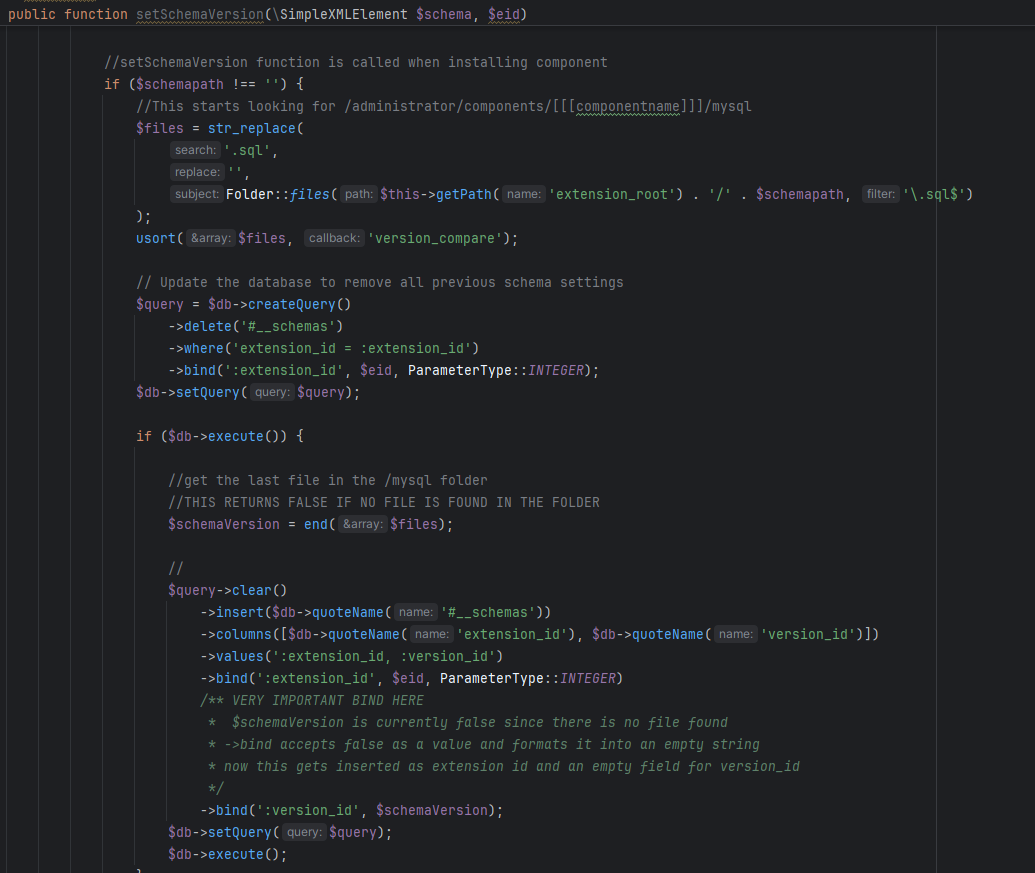
(comments are mine)
Seems like there needs to be at least 1 sql file when installing a component when the mode 'update' is selected in the component manifest file since the

parseQueriesfunction checks for thatThe Joomla documenation says that install is the default, and it'll stop processing if files are already found.

So after looking at the code the 'update' mode in the component manifest expects there to be at least 1 update file. Therefore the first initial build of a component (according to how i interpret this documentation) MUST use install, and any subsequent versions can use update



