When creating a 'Media' field and setting it to be shown in the backend, the raw media url is shown. The default admin list view uses the 'escape' function to render the field content

This function limits the value to 50 characters, and media fields are saved with lots of extra parameters, for example
Full url: images/Logos_Images/site_logo.png#joomlaImage://local-images/Logos_Images/site_logo.png?width=488&height=132.
If i wanted to show the image in an tag instead of the raw url, this would be shortend to 50 chars since the escape function has that as default.
This results in an empty string
Steps to reproduce the Bug
Create Media field
Add it to admin view and set to show in list view
Add custom code in 'getItems after all'
Logo is no longer shown
Which Joomla version are you compiling in?
5.4.3
Which PHP version are you compiling in?
8.1
Which Joomla versions are you targeting?
6.1.2
Which PHP version are you targeting?
8.1
Which Web server is JCB running on?
Ubuntu
Which Relational Database is JCB running on?
MariaDB
Which OS is JCB running on?
Ubuntu
Which JCB version are you using?
5.1.6 stable
Where in JCB did this issue occur?
Compilation of a component
On which browsers did you encounter the issue?
Firefox
Additional Comments
No response
### What Happened?
When creating a 'Media' field and setting it to be shown in the backend, the raw media url is shown. The default admin list view uses the 'escape' function to render the field content

This function limits the value to 50 characters, and media fields are saved with lots of extra parameters, for example

Full url: images/Logos_Images/site_logo.png#joomlaImage://local-images/Logos_Images/site_logo.png?width=488&height=132.
If i wanted to show the image in an <img> tag instead of the raw url, this would be shortend to 50 chars since the escape function has that as default.
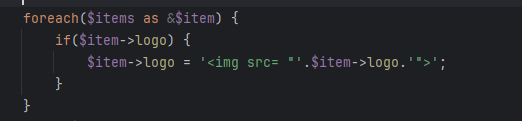
This results in an empty string
### Steps to reproduce the Bug
1) Create Media field
2) Add it to admin view and set to show in list view
3) Add custom code in 'getItems after all'
4) Logo is no longer shown
### Which Joomla version are you compiling in?
5.4.3
### Which PHP version are you compiling in?
8.1
### Which Joomla versions are you targeting?
6.1.2
### Which PHP version are you targeting?
8.1
### Which Web server is JCB running on?
Ubuntu
### Which Relational Database is JCB running on?
MariaDB
### Which OS is JCB running on?
Ubuntu
### Which JCB version are you using?
5.1.6 stable
### Where in JCB did this issue occur?
Compilation of a component
### On which browsers did you encounter the issue?
Firefox
### Additional Comments
_No response_
There is an option in the field settings that, when enabled, prevents the field’s value from being escaped where it is used. Enabling this option may resolve the issue. It is not ideal, but it is the current workaround.

There is an option in the field settings that, when enabled, prevents the field’s value from being escaped where it is used. Enabling this option may resolve the issue. It is not ideal, but it is the current workaround.
Blocking a user prevents them from interacting with repositories, such as opening or commenting on pull requests or issues. Learn more about blocking a user.
What Happened?
When creating a 'Media' field and setting it to be shown in the backend, the raw media url is shown. The default admin list view uses the 'escape' function to render the field content


tag instead of the raw url, this would be shortend to 50 chars since the escape function has that as default.

This function limits the value to 50 characters, and media fields are saved with lots of extra parameters, for example
Full url: images/Logos_Images/site_logo.png#joomlaImage://local-images/Logos_Images/site_logo.png?width=488&height=132.
If i wanted to show the image in an
This results in an empty string
Steps to reproduce the Bug
Which Joomla version are you compiling in?
5.4.3
Which PHP version are you compiling in?
8.1
Which Joomla versions are you targeting?
6.1.2
Which PHP version are you targeting?
8.1
Which Web server is JCB running on?
Ubuntu
Which Relational Database is JCB running on?
MariaDB
Which OS is JCB running on?
Ubuntu
Which JCB version are you using?
5.1.6 stable
Where in JCB did this issue occur?
Compilation of a component
On which browsers did you encounter the issue?
Firefox
Additional Comments
No response
There is an option in the field settings that, when enabled, prevents the field’s value from being escaped where it is used. Enabling this option may resolve the issue. It is not ideal, but it is the current workaround.



