When attempting to 'init' any component, the error 'field export_key doesn't have a default value' shows and initialisation stops.
Steps to reproduce the Bug
go to backend -> component builder -> components -> init
Select any (have tried multiple different sources) component to init
Error shows
Which Joomla version are you compiling in?
6.1.4
Which PHP version are you compiling in?
8.3
Which Joomla versions are you targeting?
6
Which PHP version are you targeting?
8.3
Which Web server is JCB running on?
Ubuntu
Which Relational Database is JCB running on?
MariaDB
Which OS is JCB running on?
Ubuntu
Which JCB version are you using?
6.2.0
Where in JCB did this issue occur?
Other
On which browsers did you encounter the issue?
Firefox, Chrome
Additional Comments
The health check shows all green results and no php errors are thrown in the error log.
### What Happened?
When attempting to 'init' any component, the error 'field export_key doesn't have a default value' shows and initialisation stops.
### Steps to reproduce the Bug
1) go to backend -> component builder -> components -> init
2) Select any (have tried multiple different sources) component to init
3) Error shows

### Which Joomla version are you compiling in?
6.1.4
### Which PHP version are you compiling in?
8.3
### Which Joomla versions are you targeting?
6
### Which PHP version are you targeting?
8.3
### Which Web server is JCB running on?
Ubuntu
### Which Relational Database is JCB running on?
MariaDB
### Which OS is JCB running on?
Ubuntu
### Which JCB version are you using?
6.2.0
### Where in JCB did this issue occur?
Other
### On which browsers did you encounter the issue?
Firefox, Chrome
### Additional Comments
The health check shows all green results and no php errors are thrown in the error log.
I reviewed your issue and was able to reproduce the problem. It is related to GitHub's API rate limits for unauthenticated requests.
GitHub limits the number of requests you can make without an authentication token. The repositories in JCB Comes without a token, it may reach this limit during the process, resulting in the error you encountered. Once the limit is reached, even trying to access the repository through your browser may temporarily fail.
The solution is fairly straightforward:
Go to the Repositories section in JCB.
Open the repository you are trying to import from.
Add your GitHub token, as shown in the screenshot.
Save the repository settings.
Once the token is configured, you have two options to complete the import.
Option 1: Use Pull (Recommended)
Go back to the Components area and select Pull instead of Init.
The difference between the two operations is important:
Initialize (Init): Checks what already exists in your local JCB installation and imports only what is missing.
Pull: Retrieves the complete blueprint from the repository and refreshes everything in JCB associated with that component, including records that already exist locally.
Since the initial import may have partially succeeded, JCB might already recognize the component as installed and prevent you from selecting it again during initialization. Using Pull resolves this because it refreshes existing records as well.
Keep in mind that Pull generally takes longer than Initialize.
Option 2: Delete and Initialize Again
Alternatively, you can delete the partially imported component from your local JCB installation and run Initialize again.
This allows JCB to import the component and any remaining missing dependencies from scratch.
If you are working in a test environment, this may be the simpler approach.
My recommendation is to configure your GitHub token first and then use Pull to complete the import without having to delete anything.
This is how I was able to reproduce the issue and identify a way around it.
Please let me know if this resolves the problem on your side.
Hi @SimonvanDoorne,
I reviewed your issue and was able to reproduce the problem. It is related to GitHub's API rate limits for unauthenticated requests.
GitHub limits the number of requests you can make without an authentication token. The repositories in JCB Comes without a token, it may reach this limit during the process, resulting in the error you encountered. Once the limit is reached, even trying to access the repository through your browser may temporarily fail.
**The solution is fairly straightforward:**
1. Go to the **Repositories** section in JCB.
2. Open the repository you are trying to import from.
3. Add your **GitHub token**, as shown in the screenshot.
4. Save the repository settings.

Once the token is configured, you have two options to complete the import.
**Option 1: Use Pull (Recommended)**
Go back to the Components area and select **Pull** instead of **Init**.
The difference between the two operations is important:
- **Initialize (Init):** Checks what already exists in your local JCB installation and imports only what is missing.
- **Pull:** Retrieves the complete blueprint from the repository and refreshes everything in JCB associated with that component, including records that already exist locally.
Since the initial import may have partially succeeded, JCB might already recognize the component as installed and prevent you from selecting it again during initialization. Using Pull resolves this because it refreshes existing records as well.
Keep in mind that Pull generally takes longer than Initialize.
**Option 2: Delete and Initialize Again**
Alternatively, you can delete the partially imported component from your local JCB installation and run Initialize again.
This allows JCB to import the component and any remaining missing dependencies from scratch.
If you are working in a test environment, this may be the simpler approach.
**My recommendation** is to configure your GitHub token first and then use Pull to complete the import without having to delete anything.
This is how I was able to reproduce the issue and identify a way around it.
Please let me know if this resolves the problem on your side.
Hi Lemuel, both Pull and Init give the same 'export_key' error, neither is the component shown in the list of components in JCB. It does not seem that the import 'partially' succeeded, but rather that no action happend at all. Additionally when editing the Repository, the field github token is hidden because of the Access field being set to Global
The guide on https://github.com/orgs/joomengine/discussions/995 also tells users to set the access to Global. I do not remember most of what it exactly entails to get a github token (set and forget, and it seems i've forgotten), but i do not remember a way to get an access token from a public branch. Am i remembering wrong or is there a different way of obtaining a github token?
Hi Lemuel, both Pull and Init give the same 'export_key' error, neither is the component shown in the list of components in JCB. It does not seem that the import 'partially' succeeded, but rather that no action happend at all. Additionally when editing the Repository, the field `github token` is hidden because of the `Access` field being set to `Global`

The guide on [https://github.com/orgs/joomengine/discussions/995](https://github.com/orgs/joomengine/discussions/995) also tells users to set the access to `Global`. I do not remember most of what it exactly entails to get a `github token` (set and forget, and it seems i've forgotten), but i do not remember a way to get an access token from a public branch. Am i remembering wrong or is there a different way of obtaining a github token?
@SimonvanDoorne so the token you need is a simple github api token found or setup at: Account Settings -> Credentials -> Personal access tokens (classic).
So the token is usually added to JCB's global config. Then you can just leave the Repository set to global and it will work.
But if you want to add tokens to only a specific repo the you must set the repository to override and then add the token on repository level.
We will work on improving the documentation around this feature.
@SimonvanDoorne so the token you need is a simple github api token found or setup at: **Account Settings -> Credentials -> Personal access tokens (classic)**.

So the token is usually added to JCB's global config. Then you can just leave the Repository set to `global` and it will work.

But if you want to add tokens to only a specific repo the you must set the repository to `override` and then add the token on repository level.
We will work on improving the documentation around this feature.
I think i have found the actual problem. The database #__componentbuilder_joomla_component has a field called 'export_key' which is defined as a non nullable text field, but without a default. Changing this to default '' returns a different error 'Field 'html_import_view' doesn't have a default value'.
It seems that there's an issue with the DB definitions. However, when looking at the install.xml of 6.2 there is no field 'export_key' defined in the #__componentbuilder_joomla_component table.
Looking at a J5 install of JCB the export_key field also does not exist, but checking the J4 version there is a column defined as export_key. This specific JCB installation has been upgraded from J3 all the way to J6, and it seems that process did not remove unused or unwanted columns.
(here if found the field in an old 4.0.4 install) Is there a way for the JCB install to have a 'cleanup' of sorts to remove any old fields no longer used by JCB?
I think i have found the _actual_ problem. The database #__componentbuilder_joomla_component has a field called 'export_key' which is defined as a non nullable text field, but without a default. Changing this to default '' returns a different error 'Field 'html_import_view' doesn't have a default value'.

It seems that there's an issue with the DB definitions. However, when looking at the install.xml of 6.2 there is no field 'export_key' defined in the #__componentbuilder_joomla_component table.

Looking at a J5 install of JCB the export_key field also does not exist, but checking the J4 version there _is_ a column defined as export_key. This specific JCB installation has been upgraded from J3 all the way to J6, and it seems that process did not remove unused or unwanted columns.

(here if found the field in an old 4.0.4 install) Is there a way for the JCB install to have a 'cleanup' of sorts to remove any old fields no longer used by JCB?
@SimonvanDoorne I quickly had chatgpt give us a solution for this issue, and it gave me a SQL script that should do the necessary cleanup.
Hope it works for you. https://chatgpt.com/share/6ace455b-6078-83ea-89e7-5e4bb1b79530
Blocking a user prevents them from interacting with repositories, such as opening or commenting on pull requests or issues. Learn more about blocking a user.
What Happened?
When attempting to 'init' any component, the error 'field export_key doesn't have a default value' shows and initialisation stops.
Steps to reproduce the Bug
Which Joomla version are you compiling in?
6.1.4
Which PHP version are you compiling in?
8.3
Which Joomla versions are you targeting?
6
Which PHP version are you targeting?
8.3
Which Web server is JCB running on?
Ubuntu
Which Relational Database is JCB running on?
MariaDB
Which OS is JCB running on?
Ubuntu
Which JCB version are you using?
6.2.0
Where in JCB did this issue occur?
Other
On which browsers did you encounter the issue?
Firefox, Chrome
Additional Comments
The health check shows all green results and no php errors are thrown in the error log.
Hi @SimonvanDoorne,
I reviewed your issue and was able to reproduce the problem. It is related to GitHub's API rate limits for unauthenticated requests.
GitHub limits the number of requests you can make without an authentication token. The repositories in JCB Comes without a token, it may reach this limit during the process, resulting in the error you encountered. Once the limit is reached, even trying to access the repository through your browser may temporarily fail.
The solution is fairly straightforward:
Once the token is configured, you have two options to complete the import.
Option 1: Use Pull (Recommended)
Go back to the Components area and select Pull instead of Init.
The difference between the two operations is important:
Since the initial import may have partially succeeded, JCB might already recognize the component as installed and prevent you from selecting it again during initialization. Using Pull resolves this because it refreshes existing records as well.
Keep in mind that Pull generally takes longer than Initialize.
Option 2: Delete and Initialize Again
Alternatively, you can delete the partially imported component from your local JCB installation and run Initialize again.
This allows JCB to import the component and any remaining missing dependencies from scratch.
If you are working in a test environment, this may be the simpler approach.
My recommendation is to configure your GitHub token first and then use Pull to complete the import without having to delete anything.
This is how I was able to reproduce the issue and identify a way around it.
Please let me know if this resolves the problem on your side.
Hi Lemuel, both Pull and Init give the same 'export_key' error, neither is the component shown in the list of components in JCB. It does not seem that the import 'partially' succeeded, but rather that no action happend at all. Additionally when editing the Repository, the field
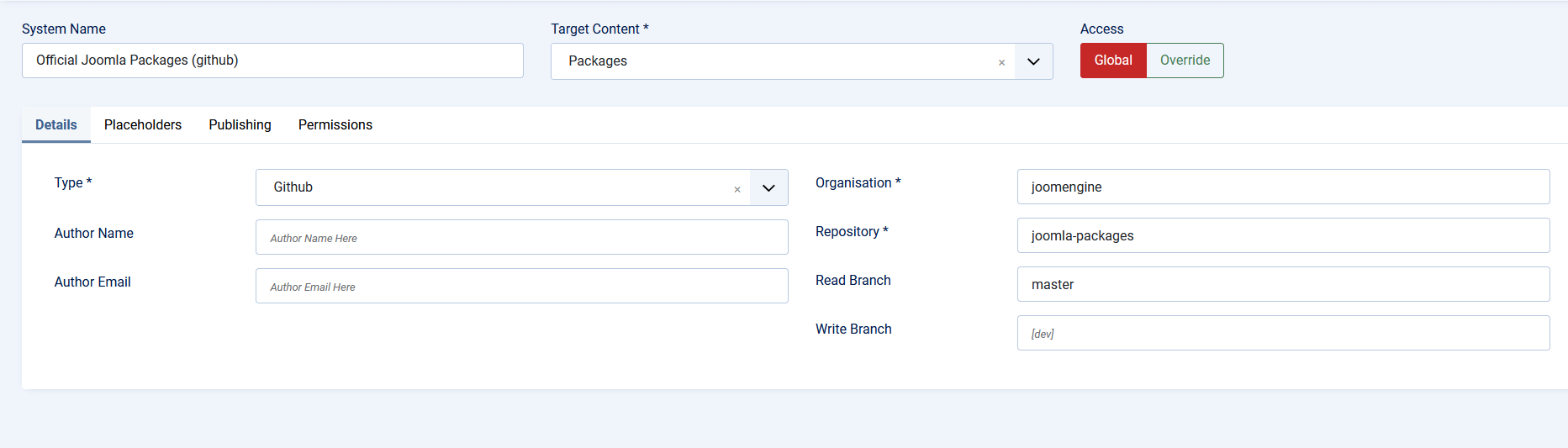
github tokenis hidden because of theAccessfield being set toGlobalThe guide on https://github.com/orgs/joomengine/discussions/995 also tells users to set the access to
Global. I do not remember most of what it exactly entails to get agithub token(set and forget, and it seems i've forgotten), but i do not remember a way to get an access token from a public branch. Am i remembering wrong or is there a different way of obtaining a github token?@SimonvanDoorne so the token you need is a simple github api token found or setup at: Account Settings -> Credentials -> Personal access tokens (classic).
So the token is usually added to JCB's global config. Then you can just leave the Repository set to

globaland it will work.But if you want to add tokens to only a specific repo the you must set the repository to
overrideand then add the token on repository level.We will work on improving the documentation around this feature.
I think i have found the actual problem. The database #__componentbuilder_joomla_component has a field called 'export_key' which is defined as a non nullable text field, but without a default. Changing this to default '' returns a different error 'Field 'html_import_view' doesn't have a default value'.

It seems that there's an issue with the DB definitions. However, when looking at the install.xml of 6.2 there is no field 'export_key' defined in the #__componentbuilder_joomla_component table.
Looking at a J5 install of JCB the export_key field also does not exist, but checking the J4 version there is a column defined as export_key. This specific JCB installation has been upgraded from J3 all the way to J6, and it seems that process did not remove unused or unwanted columns.
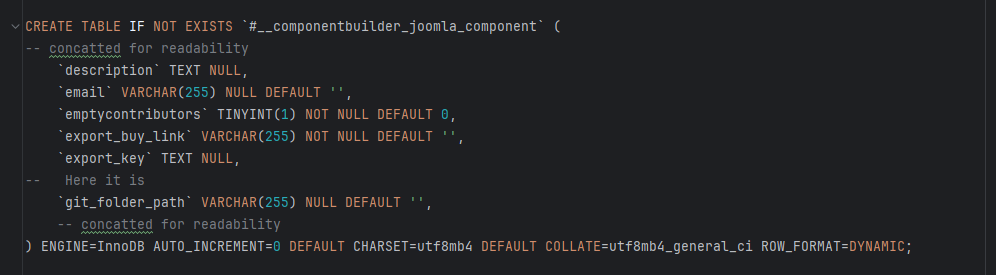
(here if found the field in an old 4.0.4 install) Is there a way for the JCB install to have a 'cleanup' of sorts to remove any old fields no longer used by JCB?
@SimonvanDoorne I quickly had chatgpt give us a solution for this issue, and it gave me a SQL script that should do the necessary cleanup.
Hope it works for you. https://chatgpt.com/share/6ace455b-6078-83ea-89e7-5e4bb1b79530



